Anywherelan
Peer-to-peer mesh VPN to connect your devices directly, no central servers
| AppID: | com.anywherelan.awl |
| Author: | Anywherelan |
| License: | MPL-2.0 |
| InRepoSince: | 2026-07-01 |
| LastRepoUpdate: | 2026-07-01 |
| LastAppUpdate: | Unknown |
| LastVersion: | 0.18.0 |
| Categories: | Connectivity, Internet, VPN & Proxy |
| Google Play: | Check if it's there |
 Anywherelan (awl) is a mesh VPN that lets you connect to any of your devices at the IP level, wherever they are. It works similarly to tinc, direct WireGuard or Tailscale, but fully peer-to-peer — there are no central coordination servers to trust or set up. Your traffic goes directly between your devices.
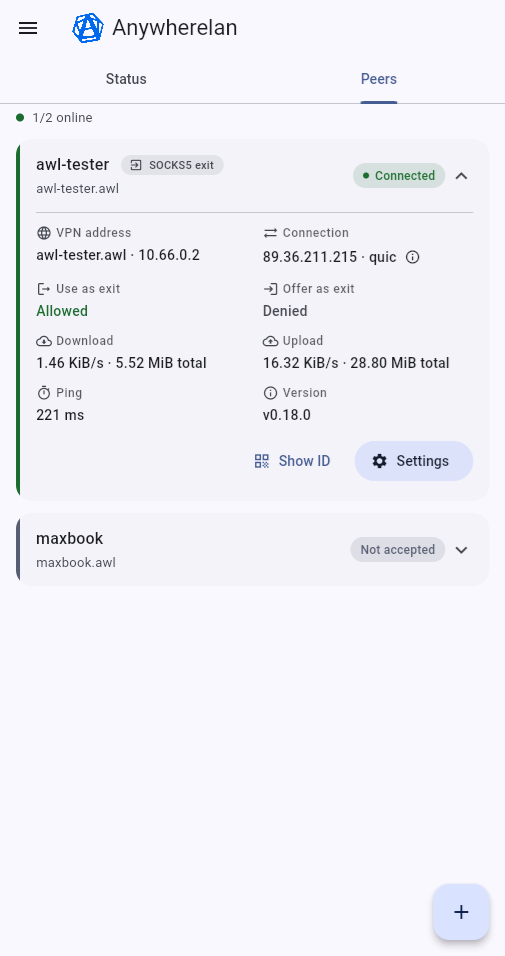
You can also route traffic through a remote device — either per-app as a SOCKS5 proxy, or all of your device's traffic at once as a full-tunnel VPN gateway (exit node).
Some use cases
- Connect to your home or work laptop over RDP/VNC/SSH even when it sits behind NAT, without configuring port forwarding.
- Reach self-hosted services like Nextcloud, Home Assistant or Bitwarden without exposing them to the internet.
- Access websites from another country by using a remote device as a SOCKS5 proxy.
- Route all of your traffic through a remote device as a full-tunnel VPN gateway (exit node), like a classic VPN.
- Gaming: local multiplayer as if everyone were on the same LAN.
- Share a development server with a colleague on another device, as an alternative to ngrok.
- Use an old Android phone remotely with scrcpy to run Android-only apps without an emulator.
Features
- Fully peer-to-peer. No third-party coordination servers — your traffic stays between your devices.
- Route traffic through a remote device like a SOCKS5 proxy.
- Full-tunnel VPN gateway: route all of your device's traffic through a remote exit node.
- Easy to use: install the app, scan the QR code of another device, and you are connected.
- Built-in NAT traversal.
- If both devices are behind NAT and direct P2P is not possible, encrypted traffic is relayed through community relays.
- TLS 1.3 encryption for all transports (QUIC and TCP).
- ed25519 peer authentication — a peer id is the device's public key.
- Cross-platform: Android, Windows, Linux, macOS.
How it works
Awl is built on top of libp2p for peer-to-peer networking and a TUN virtual interface for IP routing. QUIC or TCP with TLS is used as a transport, and a DHT is used to discover peers. On first launch, the app connects to community bootstrap nodes, registers itself, and then looks up the addresses of the peers you want to reach.
Source code, desktop builds and more documentation: https://github.com/anywherelan/awl
WhatsNew:
New: VPN gateway (full-tunnel exit node).
Route all of your device's traffic through one of your remote devices at the IP layer, like a classic VPN — not just per-app like the SOCKS5 proxy. Pick an exit node and turn it on or off without restarting the app.
Note: the exit node must be a Linux device (Android can use a gateway, but not serve as one). Only IPv4 traffic is routed.

While you can download the APKs here directly, you should preferably use an F-Droid client so the app stays up-to-date on your device.
Packages
Version 0.18.0 (2026-07-01) 

Android Versions:
- Target: 13.0
- MinVer: 7.0
- ABIs: arm64-v8a, armeabi-v7a, x86_64
Permissions:
Features:
Malware-Check:
Download (63 M)