RemotePointer
Digital Laser Pointer and Mouse Control for Presentations
| Repo: | IzzyOnDroid |
| AppID: | systems.sieber.remotespotlight |
| Author: | Georg |
| License: | GPL-3.0-only |
| Donation: | Webpage LiberaPay |
| InRepoSince: | 2022-03-15 |
| LastRepoUpdate: | 2026-06-01 |
| LastAppUpdate: | 2026-05-31 |
| LastVersion: | 3.2 |
| Categories: | Connectivity, Office |
| APK source: | Github |
| Google Play: | Check if it's there |
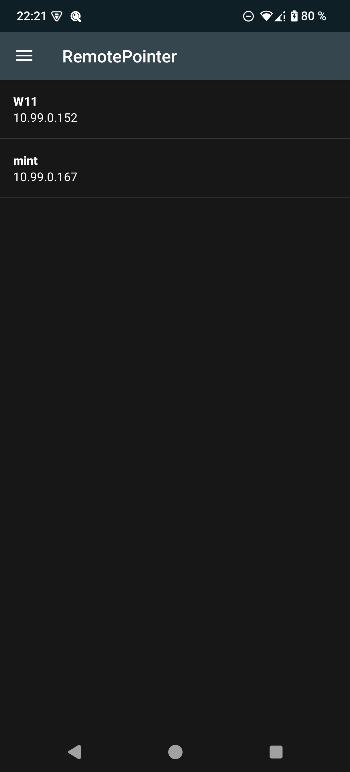
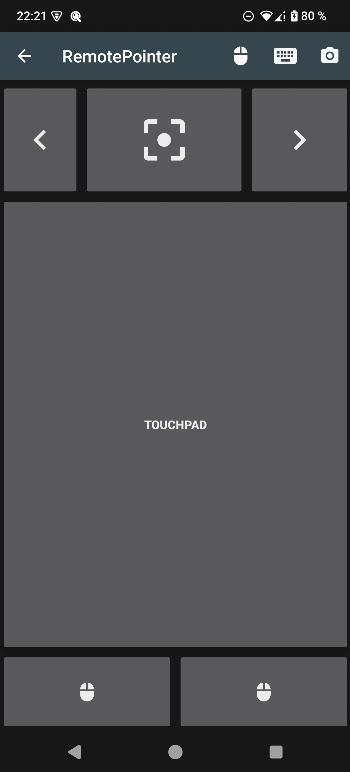
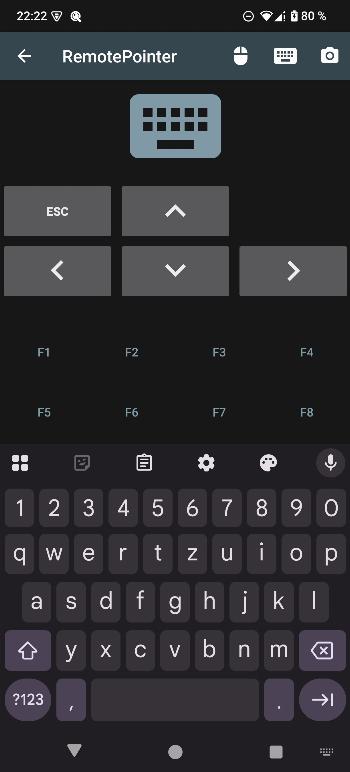
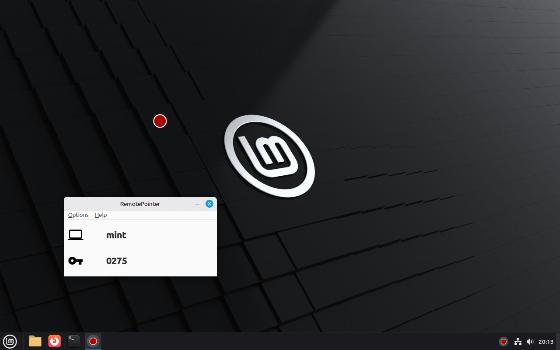
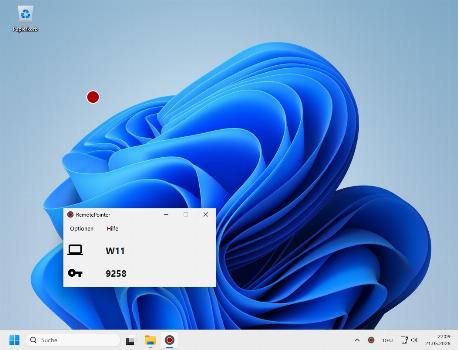
 With this app you can control your computer's keyboard and mouse (using a touchpad). Furthermore, you can project a digital laser pointer dot on your screen or projector, which is controlled by the movement of your Android device.
Advantages:
- control your computer from your couch
- when your screen output is being recorded on presentations, the laser pointer can also be recorded
- the digital laser pointer point is better visible in bright rooms
- you can simultaneously flip the slides back and forth on your Android device and control the mouse
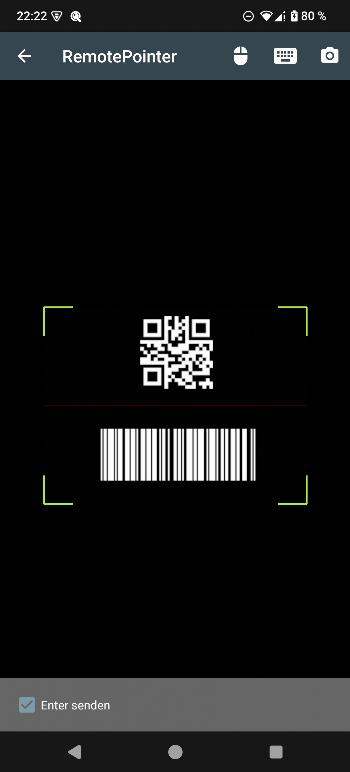
- you can use the app as barcode/QR code scanner for your computer
Please download the free software for your PC (Linux, macOS and Windows) from: https://sieber.systems/s/rp
The goal of this project is to provide a complete self-hosted remote control application without dependencies to external servers and without tracking.
While you can download the APKs here directly, you should preferably use an F-Droid client so the app stays up-to-date on your device. Some clients have this repo enabled by default, e.g. Neo Store, Droid-ify, or, of course, the IzzyOnDroid client by Sunil. With others (like the official client) you'll have to add this repo manually (see the hint on top of the package list for how to do that).
Packages
Version 3.2 (2026-06-01) 

Android Versions:
- Target: 16.0
- MinVer: 5.0
Signing Blocks
Signing Block Blobs:
:
- none
:
- none
Permissions:
- CAMERA (used by the integrated QR code scanner)
- INTERNET
- VIBRATE
- DYNAMIC_RECEIVER_NOT_EXPORTED_PERMISSION
Features:
- None
Malware-Check:Passed
47 Libraries detected:
Libraries:
- ZXing ('Zebra Crossing') (Utility)
ZXing („zebra crossing“) is an open-source, multi-format 1D/2D barcode image processing library.
- Android Support v4 (Development Framework)
The Android Support Library is not actually a single library, but rather a collection of libraries that can roughly be divided into two groups: compatibility and component libraries. For details, please see Understanding the Android Support Library.
- AndroidX Activity (Utility)
provides the base Activity subclass and the relevant hooks to build a composable structure on top.
- Android Jetpack Annotations (Utility)
library that contains the annotations for Android Jetpack.
- Arch (Utility)
helper for other arch dependencies, including JUnit test rules that can be used with LiveData.
- AppCompat (Utility)
support newer Android features on older Android versions.
- Asynclayoutinflater (UI Component)
AndroidX library to inflate layouts asynchronously to avoid jank in the UI.
- Cardview (UI Component)
AndroidX library to implement the Material Design card pattern with round corners and drop shadows.
- Android Support Library collections (Utility)
standalone efficient collections.
- Concurrent (Utility)
AndroidX library to help move tasks off the main thread with coroutines and take advantage of ListenableFuture.
- Constraint Layout Library (Utility)
library to reduce the number of nested views needed.
- Coordinatorlayout (UI Component)
AndroidX library to position top-level application widgets, such as AppBarLayout and FloatingActionButton.
- Androidx Core (Utility)
a static library that you can add to your Android application in order to use APIs that are either not available for older platform versions or utility APIs that aren't a part of the framework APIs.
- AndroidX Cursor Adapter (Utility)
static library support version of the framework's CursorAdapter.
- Android Support Library Custom View (UI Component)
a module to implement custom views. Part of the Android Support Library.
- Documentfile (UI Component)
a library to view a file document.
- Drawerlayout (UI Component)
AndroidX library to implement a Material Design drawer widget.
- Dynamicanimation (UI Component)
create smooth animations with a physics-based animation API.
- Android Emoji2 Compat (UI Component)
core library to enable emoji compatibility in Kitkat and newer devices to avoid the empty emoji characters.
- AndroidX Fragment (UI Component)
AndroidX library to encapsulate part of the user interface or behavior into reusable components.
- Interpolator (UI Component)
AndroidX library to use animation interpolators on older platforms.
- androidx.legacy (Utility)
a static library that you can add to your Android application in order to use APIs that are either not available for older platform versions or utility APIs that aren't a part of the framework APIs.
- Lifecycle (Utility)
perform actions in response to a change in the lifecycle status of another component, such as activities and fragments.
- Loader (Utility)
library to load data for your UI that survives configuration changes.
- AndroidX Local Broadcast Manager (Utility)
an application-wide event bus and embraces layer violations in your app: any component may listen events from any other.
- AndroidX Media (Utility)
share media contents and controls with other apps.
- Print (Utility)
a library to print photos, docs, and other graphics and images.
- ProfileInstaller (Utility)
AndroidX library that enables libraries to prepopulate ahead of time compilation traces to be read by ART.
- ResourceInspection (Development Aid)
AndroidX library to surface the attributes of custom views in Android Studio’s Live Layout Inspector.
- Recyclerview (Utility)
display large sets of data in your UI while minimizing memory usage.
- Android Activity Saved State (Utility)
provides the base Activity subclass and the relevant hooks to build a composable structure on top.
- Slidingpanelayout (UI Component)
AndroidX library to implement a sliding pane UI pattern.
- Startup (Utility)
AndroidX library to implement a straightforward, performant way to initialize components at app startup.
- Swiperefreshlayout (UI Component)
implemtation of the swipe-to-refresh UI pattern.
- Tracing (Utility)
AndroidX library to write trace events to the system trace buffer.
- Transition (UI Component)
animates motion in the UI with starting and ending layouts.
- Vectordrawable (UI Component)
AndroidX library to render vector graphics.
- Android Jetpack VersionedParcelable (Utility)
Provides a stable but relatively compact binary serialization format that can be passed across processes or persisted safely.
- Viewpager (UI Component)
AndroidX library to display Views or Fragments in a swipeable format.
- AndroidX Widget ViewPager2 (UI Component)
replaces AndroidX ViewPager, addressing most of its predecessor’s pain-points, including right-to-left layout support, vertical orientation, modifiable Fragment collections, etc.
- Google Material Design (Utility)
library to help with material design guidelines.
- Google Core Libraries for Java 6+ (Utility)
a set of core libraries that includes new collection types (such as multimap and multiset), immutable collections, a graph library, functional types, an in-memory cache, and APIs/utilities for concurrency, I/O, hashing, primitives, reflection, string processing, and much more.
- Error Prone (Utility)
a static analysis tool for Java that catches common programming mistakes at compile-time.
- Kotlin (Utility)
The Kotlin Programming Language
- kotlinx.coroutines (Utility)
library support for Kotlin coroutines.
- barcodescanner (Utility)
library project that provides easy to use and extensible Barcode Scanner views based on ZXing and ZBar.
- IntelliJ IDEA (Utility)
development helper: integration for the IntelliJ IDEA IDE.
Payment Modules:
- None found
development helper: integration for the IntelliJ IDEA IDE.
Ads & Analytics:
- None found
development helper: integration for the IntelliJ IDEA IDE.
Download (5 M)
Version 2.3.5 (2023-11-24) 
Android Versions:
- Target: 14.0
- MinVer: 4.0.3
Signing Blocks
Signing Block Blobs:
- 0x504b4453 (DEPENDENCY_INFO_BLOCK; GOOGLE)
:
- none
:
- none
Permissions:
- ACCESS_NETWORK_STATE
- CAMERA (used by the integrated QR code scanner)
- INTERNET
- VIBRATE
- vending.BILLING
- DYNAMIC_RECEIVER_NOT_EXPORTED_PERMISSION
Features:
- None
Malware-Check:Passed
51 Libraries detected:
Libraries:
- ZXing ('Zebra Crossing') (Utility)
ZXing („zebra crossing“) is an open-source, multi-format 1D/2D barcode image processing library.
- Android Support v4 (Development Framework)
The Android Support Library is not actually a single library, but rather a collection of libraries that can roughly be divided into two groups: compatibility and component libraries. For details, please see Understanding the Android Support Library.
- AndroidX Activity (Utility)
provides the base Activity subclass and the relevant hooks to build a composable structure on top.
- Android Jetpack Annotations (Utility)
library that contains the annotations for Android Jetpack.
- Arch (Utility)
helper for other arch dependencies, including JUnit test rules that can be used with LiveData.
- AppCompat (Utility)
support newer Android features on older Android versions.
- Asynclayoutinflater (UI Component)
AndroidX library to inflate layouts asynchronously to avoid jank in the UI.
- Cardview (UI Component)
AndroidX library to implement the Material Design card pattern with round corners and drop shadows.
- Android Support Library collections (Utility)
standalone efficient collections.
- Concurrent (Utility)
AndroidX library to help move tasks off the main thread with coroutines and take advantage of ListenableFuture.
- Constraint Layout Library (Utility)
library to reduce the number of nested views needed.
- Coordinatorlayout (UI Component)
AndroidX library to position top-level application widgets, such as AppBarLayout and FloatingActionButton.
- Androidx Core (Utility)
a static library that you can add to your Android application in order to use APIs that are either not available for older platform versions or utility APIs that aren't a part of the framework APIs.
- AndroidX Cursor Adapter (Utility)
static library support version of the framework's CursorAdapter.
- Android Support Library Custom View (UI Component)
a module to implement custom views. Part of the Android Support Library.
- Documentfile (UI Component)
a library to view a file document.
- Drawerlayout (UI Component)
AndroidX library to implement a Material Design drawer widget.
- Dynamicanimation (UI Component)
create smooth animations with a physics-based animation API.
- Android Emoji2 Compat (UI Component)
core library to enable emoji compatibility in Kitkat and newer devices to avoid the empty emoji characters.
- AndroidX Fragment (UI Component)
AndroidX library to encapsulate part of the user interface or behavior into reusable components.
- Interpolator (UI Component)
AndroidX library to use animation interpolators on older platforms.
- androidx.legacy (Utility)
a static library that you can add to your Android application in order to use APIs that are either not available for older platform versions or utility APIs that aren't a part of the framework APIs.
- Lifecycle (Utility)
perform actions in response to a change in the lifecycle status of another component, such as activities and fragments.
- Loader (Utility)
library to load data for your UI that survives configuration changes.
- AndroidX Local Broadcast Manager (Utility)
an application-wide event bus and embraces layer violations in your app: any component may listen events from any other.
- AndroidX Media (Utility)
share media contents and controls with other apps.
- Android Multi Dex Library (Utility)
helps deploying applications with multiple dex files on pre-Android 5 devices.
- Print (Utility)
a library to print photos, docs, and other graphics and images.
- ResourceInspection (Development Aid)
AndroidX library to surface the attributes of custom views in Android Studio’s Live Layout Inspector.
- Recyclerview (Utility)
display large sets of data in your UI while minimizing memory usage.
- Android Activity Saved State (Utility)
provides the base Activity subclass and the relevant hooks to build a composable structure on top.
- Slidingpanelayout (UI Component)
AndroidX library to implement a sliding pane UI pattern.
- Startup (Utility)
AndroidX library to implement a straightforward, performant way to initialize components at app startup.
- Swiperefreshlayout (UI Component)
implemtation of the swipe-to-refresh UI pattern.
- Tracing (Utility)
AndroidX library to write trace events to the system trace buffer.
- Transition (UI Component)
animates motion in the UI with starting and ending layouts.
- Vectordrawable (UI Component)
AndroidX library to render vector graphics.
- Android Jetpack VersionedParcelable (Utility)
Provides a stable but relatively compact binary serialization format that can be passed across processes or persisted safely.
- Viewpager (UI Component)
AndroidX library to display Views or Fragments in a swipeable format.
- AndroidX Widget ViewPager2 (UI Component)
replaces AndroidX ViewPager, addressing most of its predecessor’s pain-points, including right-to-left layout support, vertical orientation, modifiable Fragment collections, etc.
- Firebase Data Transport (Utility)
Firebase Data Transport is part of Google’s Firebase SDK.
- Google Material Design (Utility)
library to help with material design guidelines.
- Google Core Libraries for Java 6+ (Utility)
a set of core libraries that includes new collection types (such as multimap and multiset), immutable collections, a graph library, functional types, an in-memory cache, and APIs/utilities for concurrency, I/O, hashing, primitives, reflection, string processing, and much more.
- Error Prone (Utility)
a static analysis tool for Java that catches common programming mistakes at compile-time.
- FirebaseⓃ© (Utility)

- JavaX Dependency Injection (Utility)
specifies a means for obtaining objects in such a way as to maximize reusability, testability and maintainability compared to traditional approaches such as constructors, factories, and service locators (e.g., JNDI). This process, known as dependency injection, is beneficial to most nontrivial applications.
- Kotlin (Utility)
The Kotlin Programming Language
- kotlinx.coroutines (Utility)
library support for Kotlin coroutines.
- barcodescanner (Utility)
library project that provides easy to use and extensible Barcode Scanner views based on ZXing and ZBar.
- IntelliJ IDEA (Utility)
development helper: integration for the IntelliJ IDEA IDE.
Payment Modules:
- BillingClient©Ⓝ (Payment)
Google Play Billing Library
Ads & Analytics:
- None found
Google Play Billing Library
Download (5.3 M)
Version 2.3.4 (2023-10-20)
Android Versions:
- Target: 14.0
- MinVer: 4.0.3
Signing Blocks
Signing Block Blobs:
- 0x504b4453 (DEPENDENCY_INFO_BLOCK; GOOGLE)
:
- none
:
- none
Permissions:
- ACCESS_NETWORK_STATE
- CAMERA (used by the integrated QR code scanner)
- INTERNET
- VIBRATE
- vending.BILLING
- DYNAMIC_RECEIVER_NOT_EXPORTED_PERMISSION
Features:
- None
Malware-Check:Passed
51 Libraries detected:
Libraries:
- ZXing ('Zebra Crossing') (Utility)
ZXing („zebra crossing“) is an open-source, multi-format 1D/2D barcode image processing library.
- Android Support v4 (Development Framework)
The Android Support Library is not actually a single library, but rather a collection of libraries that can roughly be divided into two groups: compatibility and component libraries. For details, please see Understanding the Android Support Library.
- AndroidX Activity (Utility)
provides the base Activity subclass and the relevant hooks to build a composable structure on top.
- Android Jetpack Annotations (Utility)
library that contains the annotations for Android Jetpack.
- Arch (Utility)
helper for other arch dependencies, including JUnit test rules that can be used with LiveData.
- AppCompat (Utility)
support newer Android features on older Android versions.
- Asynclayoutinflater (UI Component)
AndroidX library to inflate layouts asynchronously to avoid jank in the UI.
- Cardview (UI Component)
AndroidX library to implement the Material Design card pattern with round corners and drop shadows.
- Android Support Library collections (Utility)
standalone efficient collections.
- Concurrent (Utility)
AndroidX library to help move tasks off the main thread with coroutines and take advantage of ListenableFuture.
- Constraint Layout Library (Utility)
library to reduce the number of nested views needed.
- Coordinatorlayout (UI Component)
AndroidX library to position top-level application widgets, such as AppBarLayout and FloatingActionButton.
- Androidx Core (Utility)
a static library that you can add to your Android application in order to use APIs that are either not available for older platform versions or utility APIs that aren't a part of the framework APIs.
- AndroidX Cursor Adapter (Utility)
static library support version of the framework's CursorAdapter.
- Android Support Library Custom View (UI Component)
a module to implement custom views. Part of the Android Support Library.
- Documentfile (UI Component)
a library to view a file document.
- Drawerlayout (UI Component)
AndroidX library to implement a Material Design drawer widget.
- Dynamicanimation (UI Component)
create smooth animations with a physics-based animation API.
- Android Emoji2 Compat (UI Component)
core library to enable emoji compatibility in Kitkat and newer devices to avoid the empty emoji characters.
- AndroidX Fragment (UI Component)
AndroidX library to encapsulate part of the user interface or behavior into reusable components.
- Interpolator (UI Component)
AndroidX library to use animation interpolators on older platforms.
- androidx.legacy (Utility)
a static library that you can add to your Android application in order to use APIs that are either not available for older platform versions or utility APIs that aren't a part of the framework APIs.
- Lifecycle (Utility)
perform actions in response to a change in the lifecycle status of another component, such as activities and fragments.
- Loader (Utility)
library to load data for your UI that survives configuration changes.
- AndroidX Local Broadcast Manager (Utility)
an application-wide event bus and embraces layer violations in your app: any component may listen events from any other.
- AndroidX Media (Utility)
share media contents and controls with other apps.
- Android Multi Dex Library (Utility)
helps deploying applications with multiple dex files on pre-Android 5 devices.
- Print (Utility)
a library to print photos, docs, and other graphics and images.
- ResourceInspection (Development Aid)
AndroidX library to surface the attributes of custom views in Android Studio’s Live Layout Inspector.
- Recyclerview (Utility)
display large sets of data in your UI while minimizing memory usage.
- Android Activity Saved State (Utility)
provides the base Activity subclass and the relevant hooks to build a composable structure on top.
- Slidingpanelayout (UI Component)
AndroidX library to implement a sliding pane UI pattern.
- Startup (Utility)
AndroidX library to implement a straightforward, performant way to initialize components at app startup.
- Swiperefreshlayout (UI Component)
implemtation of the swipe-to-refresh UI pattern.
- Tracing (Utility)
AndroidX library to write trace events to the system trace buffer.
- Transition (UI Component)
animates motion in the UI with starting and ending layouts.
- Vectordrawable (UI Component)
AndroidX library to render vector graphics.
- Android Jetpack VersionedParcelable (Utility)
Provides a stable but relatively compact binary serialization format that can be passed across processes or persisted safely.
- Viewpager (UI Component)
AndroidX library to display Views or Fragments in a swipeable format.
- AndroidX Widget ViewPager2 (UI Component)
replaces AndroidX ViewPager, addressing most of its predecessor’s pain-points, including right-to-left layout support, vertical orientation, modifiable Fragment collections, etc.
- Firebase Data Transport (Utility)
Firebase Data Transport is part of Google’s Firebase SDK.
- Google Material Design (Utility)
library to help with material design guidelines.
- Google Core Libraries for Java 6+ (Utility)
a set of core libraries that includes new collection types (such as multimap and multiset), immutable collections, a graph library, functional types, an in-memory cache, and APIs/utilities for concurrency, I/O, hashing, primitives, reflection, string processing, and much more.
- Error Prone (Utility)
a static analysis tool for Java that catches common programming mistakes at compile-time.
- FirebaseⓃ© (Utility)
- JavaX Dependency Injection (Utility)
specifies a means for obtaining objects in such a way as to maximize reusability, testability and maintainability compared to traditional approaches such as constructors, factories, and service locators (e.g., JNDI). This process, known as dependency injection, is beneficial to most nontrivial applications.
- Kotlin (Utility)
The Kotlin Programming Language
- kotlinx.coroutines (Utility)
library support for Kotlin coroutines.
- barcodescanner (Utility)
library project that provides easy to use and extensible Barcode Scanner views based on ZXing and ZBar.
- IntelliJ IDEA (Utility)
development helper: integration for the IntelliJ IDEA IDE.
Payment Modules:
- BillingClient©Ⓝ (Payment)
Google Play Billing Library
Ads & Analytics:
- None found
Google Play Billing Library
Download (5.3 M)